Vehicle Acceleration Monitor 2.0
921
7
921
7
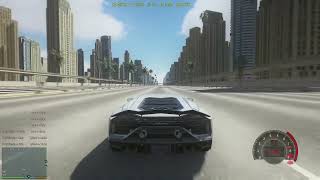
This is a script that can test the acceleration performance of each vehicle, which is very useful for players who specialize in studying the performance of game vehicles or players who are keen on modifying the Handling.meta data of vehicles
Extract the downloaded file and place the VehiclePerformeTracker.dll and VehiclePerformeTracker.ini files into the scripts folder of the game's main directory
The configuration file Vehicle Performance Tracker. ini allows you to modify the acceleration score, mile acceleration time, top speed HUD X, Y, Z positions, and text size. After making the necessary changes, press F5 in the game (the default button can be customized and modified in Vehicle Performance Tracker. ini) to refresh the position
After entering the vehicle, start the engine to display various scores
The acceleration score needs to reach the specified speed to be displayed, otherwise it will be hidden without a limit (0-100, 0-200... 0-1000...)
Mileage acceleration time needs to reach the specified level to be displayed, otherwise hide the maximum monitoring of 5 miles (1/4mile, 1/2mile, 1mile, 2mile, 3mile, 4mile, 5mile)
The maximum speed will remain displayed unless you turn off the engine or get off the car
Required plugins
ScriptHookV
dinput8.dll
ScriptHookVDotNet-v3.7.0-nightly.78
.NET
Tip: Currently, the script has only been successfully tested in the LEGACY version. It is unknown whether the ENHANCED version supports it. If you have tried and it works, please let me know in the comment section. Thank you
update
2.0
-The display "HUD=XXs" at the top of the screen when the vehicle speed is 0 has been removed
-Thoroughly fixed the problem of brake measurement logic error. Now you can calculate the distance and time required to decelerate to 0 at every 100km/h node, such as 100-0, 200-0, and 300-0
-Add the distance required for acceleration to the measurement of driving distance, for example, what you see now is 0-100km/h=2.9s 68.4m
-Add the instantaneous speed at the distance node to the mile measurement data. For example, what you see now is 1/4mile=9.8s 245km/h
-In order to prevent hud from constantly displaying, I have added a shortcut key for opening/closing the script. You can customize the details in the configuration file. Please open ini to view it yourself. If you do not need to use this measurement script, you can close it
-Set the measured data to permanent display until you accelerate the vehicle again, then the old data will be automatically cleared and a new measurement will begin
-Added refresh rate options for HUD content. If you notice the HUD flickering, it may be caused by your game's high frame rate. You can reduce the value of 'interval' in the configuration file
Extract the downloaded file and place the VehiclePerformeTracker.dll and VehiclePerformeTracker.ini files into the scripts folder of the game's main directory
The configuration file Vehicle Performance Tracker. ini allows you to modify the acceleration score, mile acceleration time, top speed HUD X, Y, Z positions, and text size. After making the necessary changes, press F5 in the game (the default button can be customized and modified in Vehicle Performance Tracker. ini) to refresh the position
After entering the vehicle, start the engine to display various scores
The acceleration score needs to reach the specified speed to be displayed, otherwise it will be hidden without a limit (0-100, 0-200... 0-1000...)
Mileage acceleration time needs to reach the specified level to be displayed, otherwise hide the maximum monitoring of 5 miles (1/4mile, 1/2mile, 1mile, 2mile, 3mile, 4mile, 5mile)
The maximum speed will remain displayed unless you turn off the engine or get off the car
Required plugins
ScriptHookV
dinput8.dll
ScriptHookVDotNet-v3.7.0-nightly.78
.NET
Tip: Currently, the script has only been successfully tested in the LEGACY version. It is unknown whether the ENHANCED version supports it. If you have tried and it works, please let me know in the comment section. Thank you
update
2.0
-The display "HUD=XXs" at the top of the screen when the vehicle speed is 0 has been removed
-Thoroughly fixed the problem of brake measurement logic error. Now you can calculate the distance and time required to decelerate to 0 at every 100km/h node, such as 100-0, 200-0, and 300-0
-Add the distance required for acceleration to the measurement of driving distance, for example, what you see now is 0-100km/h=2.9s 68.4m
-Add the instantaneous speed at the distance node to the mile measurement data. For example, what you see now is 1/4mile=9.8s 245km/h
-In order to prevent hud from constantly displaying, I have added a shortcut key for opening/closing the script. You can customize the details in the configuration file. Please open ini to view it yourself. If you do not need to use this measurement script, you can close it
-Set the measured data to permanent display until you accelerate the vehicle again, then the old data will be automatically cleared and a new measurement will begin
-Added refresh rate options for HUD content. If you notice the HUD flickering, it may be caused by your game's high frame rate. You can reduce the value of 'interval' in the configuration file
Tải lên lần đầu: 20 Tháng mười hai, 2025
Cập nhật lần cuối: 06 Tháng một, 2026
Last Downloaded: 23 hours ago
16 Bình luận
More mods by Lisztdreams:
This is a script that can test the acceleration performance of each vehicle, which is very useful for players who specialize in studying the performance of game vehicles or players who are keen on modifying the Handling.meta data of vehicles
Extract the downloaded file and place the VehiclePerformeTracker.dll and VehiclePerformeTracker.ini files into the scripts folder of the game's main directory
The configuration file Vehicle Performance Tracker. ini allows you to modify the acceleration score, mile acceleration time, top speed HUD X, Y, Z positions, and text size. After making the necessary changes, press F5 in the game (the default button can be customized and modified in Vehicle Performance Tracker. ini) to refresh the position
After entering the vehicle, start the engine to display various scores
The acceleration score needs to reach the specified speed to be displayed, otherwise it will be hidden without a limit (0-100, 0-200... 0-1000...)
Mileage acceleration time needs to reach the specified level to be displayed, otherwise hide the maximum monitoring of 5 miles (1/4mile, 1/2mile, 1mile, 2mile, 3mile, 4mile, 5mile)
The maximum speed will remain displayed unless you turn off the engine or get off the car
Required plugins
ScriptHookV
dinput8.dll
ScriptHookVDotNet-v3.7.0-nightly.78
.NET
Tip: Currently, the script has only been successfully tested in the LEGACY version. It is unknown whether the ENHANCED version supports it. If you have tried and it works, please let me know in the comment section. Thank you
update
2.0
-The display "HUD=XXs" at the top of the screen when the vehicle speed is 0 has been removed
-Thoroughly fixed the problem of brake measurement logic error. Now you can calculate the distance and time required to decelerate to 0 at every 100km/h node, such as 100-0, 200-0, and 300-0
-Add the distance required for acceleration to the measurement of driving distance, for example, what you see now is 0-100km/h=2.9s 68.4m
-Add the instantaneous speed at the distance node to the mile measurement data. For example, what you see now is 1/4mile=9.8s 245km/h
-In order to prevent hud from constantly displaying, I have added a shortcut key for opening/closing the script. You can customize the details in the configuration file. Please open ini to view it yourself. If you do not need to use this measurement script, you can close it
-Set the measured data to permanent display until you accelerate the vehicle again, then the old data will be automatically cleared and a new measurement will begin
-Added refresh rate options for HUD content. If you notice the HUD flickering, it may be caused by your game's high frame rate. You can reduce the value of 'interval' in the configuration file
Extract the downloaded file and place the VehiclePerformeTracker.dll and VehiclePerformeTracker.ini files into the scripts folder of the game's main directory
The configuration file Vehicle Performance Tracker. ini allows you to modify the acceleration score, mile acceleration time, top speed HUD X, Y, Z positions, and text size. After making the necessary changes, press F5 in the game (the default button can be customized and modified in Vehicle Performance Tracker. ini) to refresh the position
After entering the vehicle, start the engine to display various scores
The acceleration score needs to reach the specified speed to be displayed, otherwise it will be hidden without a limit (0-100, 0-200... 0-1000...)
Mileage acceleration time needs to reach the specified level to be displayed, otherwise hide the maximum monitoring of 5 miles (1/4mile, 1/2mile, 1mile, 2mile, 3mile, 4mile, 5mile)
The maximum speed will remain displayed unless you turn off the engine or get off the car
Required plugins
ScriptHookV
dinput8.dll
ScriptHookVDotNet-v3.7.0-nightly.78
.NET
Tip: Currently, the script has only been successfully tested in the LEGACY version. It is unknown whether the ENHANCED version supports it. If you have tried and it works, please let me know in the comment section. Thank you
update
2.0
-The display "HUD=XXs" at the top of the screen when the vehicle speed is 0 has been removed
-Thoroughly fixed the problem of brake measurement logic error. Now you can calculate the distance and time required to decelerate to 0 at every 100km/h node, such as 100-0, 200-0, and 300-0
-Add the distance required for acceleration to the measurement of driving distance, for example, what you see now is 0-100km/h=2.9s 68.4m
-Add the instantaneous speed at the distance node to the mile measurement data. For example, what you see now is 1/4mile=9.8s 245km/h
-In order to prevent hud from constantly displaying, I have added a shortcut key for opening/closing the script. You can customize the details in the configuration file. Please open ini to view it yourself. If you do not need to use this measurement script, you can close it
-Set the measured data to permanent display until you accelerate the vehicle again, then the old data will be automatically cleared and a new measurement will begin
-Added refresh rate options for HUD content. If you notice the HUD flickering, it may be caused by your game's high frame rate. You can reduce the value of 'interval' in the configuration file
Tải lên lần đầu: 20 Tháng mười hai, 2025
Cập nhật lần cuối: 06 Tháng một, 2026
Last Downloaded: 23 hours ago


The currently known vulnerability is an error in the display of vehicle brake data. I will adjust it in future updates
@Lisztdreams what speedometer are you using? its yours? upload it please
@Neuromance I am using the dashboard module of XMOD. It works very well. https://www.gta5-mods.com/scripts/nfsgauge-rpm-gear-speedometer
很好可以作为racetimer的替代
@Lisztdreams What background map is that and where can i download?
@sabbir00015278 https://www.gta5-mods.com/maps/dubai-highway-add-on-sp-oiv-fivem
bro ur absolutely floodig the scripts section 😂😂😂
@Aztecz8798 I just tested it in Enhanced mode and it works well, but in my opinion, the information disappears very quickly when the vehicle stops. I think the 100-0 km/h value in meters is incorrect, and I've noticed that when the vehicle is stopped, some text appears at the top center, but another mod covers it up, and I'd like to disable it. The same goes for the text that appears when I press F5; some characters aren't loading correctly. I would also suggest a button or key combination to activate or deactivate the script.
I think it's a very interesting mod with a lot of potential.
@Antthony_12 i think u pinged the wrong person
@Aztecz8798 ouuuu I am very sorry!!!
@Antthony_12 np
@Lisztdreams I just tested it in Enhanced mode and it works well, but in my opinion, the information disappears very quickly when the vehicle stops. I think the 100-0 km/h value in meters is incorrect, and I've noticed that when the vehicle is stopped, some text appears at the top center, but another mod covers it up, and I'd like to disable it. The same goes for the text that appears when I press F5; some characters aren't loading correctly. I would also suggest a button or key combination to activate or deactivate the script.
I think it's a very interesting mod with a lot of potential.
@Antthony_12 First of all, thank you so much for your feedback. In the latest version, I have removed the yellow text that appeared at the top center of the screen when the vehicle comes to a stop. Currently, I am still working on fixing the calculation error for the brake time display data. I am also considering how to keep the parking HUD visible and make it fade out in a more natural way. All of these improvements are planned for the latest version update.😂
Nice, I'll be here waiting patiently :)
@Antthony_12 I have updated to version 2.0 and fixed many issues. You can download and try it out. I have written the update details at the end of the introduction
@Lisztdreams Now is perfect! Thanks you very much!